ID: I202603211417
Status: idea
Tags: communication, SIM-card
D-Link DWM-222 SIM Adapter uitzoeken
Bought from amazon
The D-Link DWM-222 SIM Adapter supposedly allows you to SMS and use internet on any device.
Included manual
PRODUCT SETUP
INSERT SIM CARD BEFORE USING Insert the SIM card by following the icon direction shown in the diagram on the left or use the SIM adapter if required.
INSERT SIM CARD BEFORE USING Slide the cover on the back of the device and lift off. Then insert the SIM card by following the icon direction.
SOFTWARE INSTALLATION Insert the DWM-222 into a USB port on your computer. The set-up wizard should start automatically. Make sure that your SIM card is in the slot. Follow the steps within the wizard to complete the set-up of DWM-222.
TROUBLESHOOTING
WHERE CAN I FIND MORE INFORMATION ABOUT HOW TO USE THIS DEVICE? A comprehensive User Manual is available for the DWM-222. Open the D-Link Mobile Connection manager and click: Help.
WHY AM I UNABLE TO CONNECT TO A MOBILE SERVICE NETWORK? The DWM-222 requires a SIM card registered with a compatible service network. For information about the services that your SIM card provides access to, please contact your mobile service provider.
WHY IS THE SOFTWARE ASKING FOR A PIN NUMBER? For security, some SIM cards have a PIN number enabled. If the SIM was used in a previous device, the PIN will be the same as it was before. If you did not set a PIN, please contact your mobile service provider.
LED INDICATION
- Red (blinking): No SIM card / Error
- Green (blinking): Connected to LTE network
- Blue (blinking): Connected to 3G network
TECHNICAL SUPPORT
dlink.com/support
I am only trying to get SMS working, so this might help you also fix your data, but maybe not.
The steps I took
Below is a list of the steps I took to get where I have gotten.
Things I haven’t tried yet
- using another SIM
- using another SD card
- using without SD card
- using Windows
Finding device information
As you can see in the included manual, me, a Linux did not get the Set-up wizard. And my led is red. So that is interesting. Cause it is a prepaid SIM-card that I did test in a phone. (it has 20 euros of calling on it), and I was able to sms on it and to it.
These are the steps I did to find out how to work with it. Since I deleted my windows partition a while ago.
I ran sudo dmesg | tail -20 to check recently added devices, and got:
usb 1-3: Product: Mobile Connect
usb 1-3: Manufacturer: Mobile Connect
usb 1-3: SerialNumber: 0123456789ABCDEF
rndis_host 1-3:1.0 usb0: register 'rndis_host' at usb-0000:0e:00.0-3, RNDIS device, c2:ee:32:9d:c7:d0
usb-storage 1-3:1.2: USB Mass Storage device detected
scsi host6: usb-storage 1-3:1.2
rndis_host 1-3:1.0 enxc2ee329dc7d0: renamed from usb0
So then I did a search for the IP Addresses of enxc2ee329dc7d0 with this command ip route | grep enxc2ee329dc7d0, and that returned:
default via 192.168.125.1 dev enxc2ee329dc7d0 proto dhcp src 192.168.125.37 metric 101
192.168.125.0/24 dev enxc2ee329dc7d0 proto kernel scope link src 192.168.125.37 metric 101
From this we found out that it was running on 192.168.125.1, so I did a Nmap scan: nmap -p 80,8080,8888 192.168.125.1, and this was the response:
Starting Nmap 7.94SVN ( https://nmap.org ) at 2026-03-21 13:31 CET
Nmap scan report for _gateway (192.168.125.1)
Host is up (0.0011s latency).

PORT     STATE  SERVICE
80/tcp   open   http
8080/tcp closed http-proxy
8888/tcp closed sun-answerbook

Nmap done: 1 IP address (1 host up) scanned in 0.03 seconds
And then I thought, let’s just open it as an weburl: http://192.168.125.1/ and found out it has indeed a website.
Web interface
Setup Wizard
From there I could open a setup wizard. This setup wizard has 3 tabs:
Connection settings:
- APN Selection Mode - A dropdown with
manualandautoManualturns APN into a textfield, and adds a new item to the from: APN Method - Dropdown withNone,PAP,CHAPandAuto (PAP & CHAP)
- Allow Data Roaming - A toggle
- APN - An empty dropdown
- User Name - textfield
- Password - textfield
So I filled in:
- Selection Mode: Manual
- Roaming: False
- APN:
en.lebara.mobi, I got this from this lebara page - APN Method:
Auto (PAP & CHAP)
I left the Username and password fields empty.
Admin settings This is just a translation option.
Apply settings
- Please check all settings in this wizard again before you click ‘Apply’.
- After applied new settings, you system will need to reboot.
lol
After clicking apply, I got a message device is rebooting, please wait 90s.
After those 90s, my led was still blinking red.
Then I changed the APN to multimedia.lebara.nl since apparently I took the french one. And this website has all the dutch APNs.
After those 90s, my led was still blinking red.
PIN management
In the website, I clicked the internet button. and then clicked the SIM Card PIN Lock tab.
Here I entered my PUK Number, and just changed my pin to another number.
But then I got SIM unblock fail., and this is not because of a wrong PUK, cause that gave a different error when I made a typo.
So, the fact that resetting the PIN with the PUK doesn’t work, and that there isn’t an “unlock” option for the sim in the website, that sounds like this is not the issue, or the website assumes it should’ve already been unlocked beforehand?
Other settings
I tried changing the PLMN mode to manual, but then it got stuck on searching Operators...,
I tried setting Preferred Cellular to 4G Mode in the Connection mode settings, and afterwards running the setup wizard again. Didn’t fix it.
More research
I have firmware version 3.0.1EUR on my D-Link DWM-222 (hardware revision A3). This is a recent version that switched the device to RNDIS mode only, which exposes it as a network adapter rather than a modem. This is why I’m not getting serial ports and cannot access SMS functionality on Linux. I learned this from this post on the Arch Linux forums, where the user found another forum where they talked about the downgrade.
I found older firmware versions available on dlink their german FTP website.
But this is a plausable issue, it doesn’t explain why the data doesn’t work, and why the it is flashing red, cause this above explenation would only be a plausable explenation if it was just the SMS not working
Windows
it can also be that it’d just be fixed if I were running Windows. So guess I’ll be reinstalling a windows partition onto my pc. This means, killing my current arch installation. :3
After making me hate myself and reinstalling windows, and installing obsidian n stuff so that I can function, I plugged it in again, and it was still flashing red. so windows was not the issue.
But wait, I was wrong. I opened my file explorer and saw files:
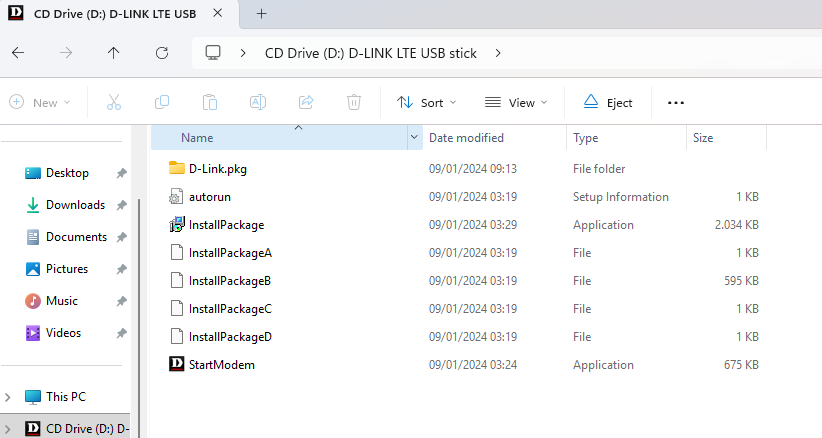
So I tried running StartModem, that removed the disk from my pc. It also added a shortcut to my desktop leading to, you guessed it: http://192.168.125.1/index.html It is still flashing red.
I tried unplugging and replugging, that added back the disk for a few seconds, and then it disappeared again, after opening the page in my browser.
This isn’t fixing anything.
I tried putting my own SIM in it, But it is still flashing red.
Alas I tried taking out the SD card. Still flashing red.
Conclusion
No matter which SIM, no matter which SD, no matter the OS, the led keeps blinking red. And the only error I have really seen throughout is when trying to open the SMS page on the website, and the error message never changed:
Get sms center number failed!
The USB is probably faulty, and we were just unlucky.