ID: I202605161316
Status: idea
Tags: avans 2-4 LU1, avans 2-4 softwarearchitectuur en kwaliteit vak, avans 2-4 softwaredesign en kwaliteit vak
software design en architectuur
Het verschil tussen design en architectuur is dat design een software ontwerp is op detail nevieau, het is heel dichtbij de code, denk aan niveau 4 van het C4 Diagram. Software Architectuur is een ontwerp op globaler niveau, het systeem als het geheel, denk aan niveau 2 en 3 van het C4 Diagram. Een opdeling van geheel in onderdelen / subsystemen.
Design for change
De rede dat je een goed ontwerp wilt is omdat het makkelijker is om het hele plaatje op je in te nemen. Verder kan je tijdens het ontwerpen van een diagram ook makkelijker designen voor verandering. Design for change, het idee dat je je software designed op een manier die het in de toekomst makkelijk maakt om een verandering door te voeren. Want als je iets niet designed voor verandering, zal je software sterven, want vanzelf wordt het doorvoeren van een verandering te moeilijk, te duur of te lang, dan is het makkelijker om opnieuw te beginnen.
Design smells
Wanneer je een applicatie wilt updaten, kan je tegen meerdere dingen aanlopen, dit noemen we de Design Smells. Design smells zijn dingen zoals Rigidity, het moeilijk aanpasbaarheid van code, of het sneelbaleffect waar 1 kleine verandering een lawine aan veranderingen veroorzaakt. Fragility is ook een design smell, een kleine aanpassing breekt software op meer plaatsen. Complexity, als methoden of klassen te lang zijn met te veel logica. Opacity wanneer de code moeilijk is te begrijpen. Design smells zijn dingen die je vaak zult tegen komen bij het uitbereiden van een systeem die niet goed gedesigned is.
Design Principles
Er zijn design principles die er voor zorgen dat je ontwerp goed is.
SOLID Design Principles
Het SOLID design principle is een van de design principles die je ontwerpen verbeteren:
- Single Responsibility principle
- A class should have one, and only one, reason to change. In other words, every class should have only one responsibility.
- Open–closed principle
- A class should be open for extending its behavior, closed for modifications
- Liskov substitution principle
- Functions that use pointers or references to base classes must be able to use pointers or references of derived classes without knowing it.
- Interface segregation principle
- Clients should not be forced to depend upon interface methods that they do not use.
- Dependency inversion principle
- Depend upon abstractions, not concretes
Design goals
Er zijn verschillende redenen die je kan hebben om een ontwerp te maken, denk bijvoorbeeld aan Modifiability, Extensibility, Reusability, Testability, Security en Efficiency. Vaak zijn er meerdere dingen die je wilt. Sommige van deze doelen kunnen tegestrijdig zijn.
Design patterns
Design Patterns zijn oplossingen voor veel voorkomende problemen in de software development industry, en dan hebben we het natuurlijk over design problemen.
 Een of ander bekend boek.
Factory Pattern
Een factory pattern lost het probleem op van massive constructors. Door een factory te maken die vele globale argumenten heeft, hoef je daarna alleen maar de factory mee te geven aan andere klassen. Dit zorgt er voor dat je veel minder constructor argumenten krijgt.
Simple Factory
Een simple factory is gewoon een factory die jou de juiste implementatie van een interface terug geeft.
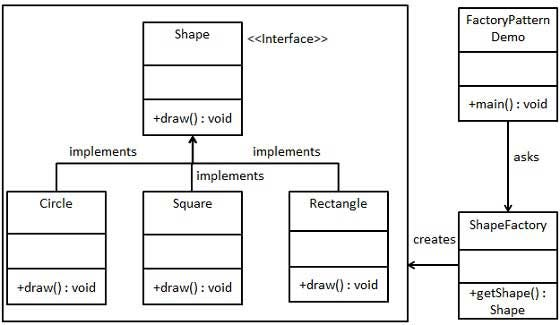
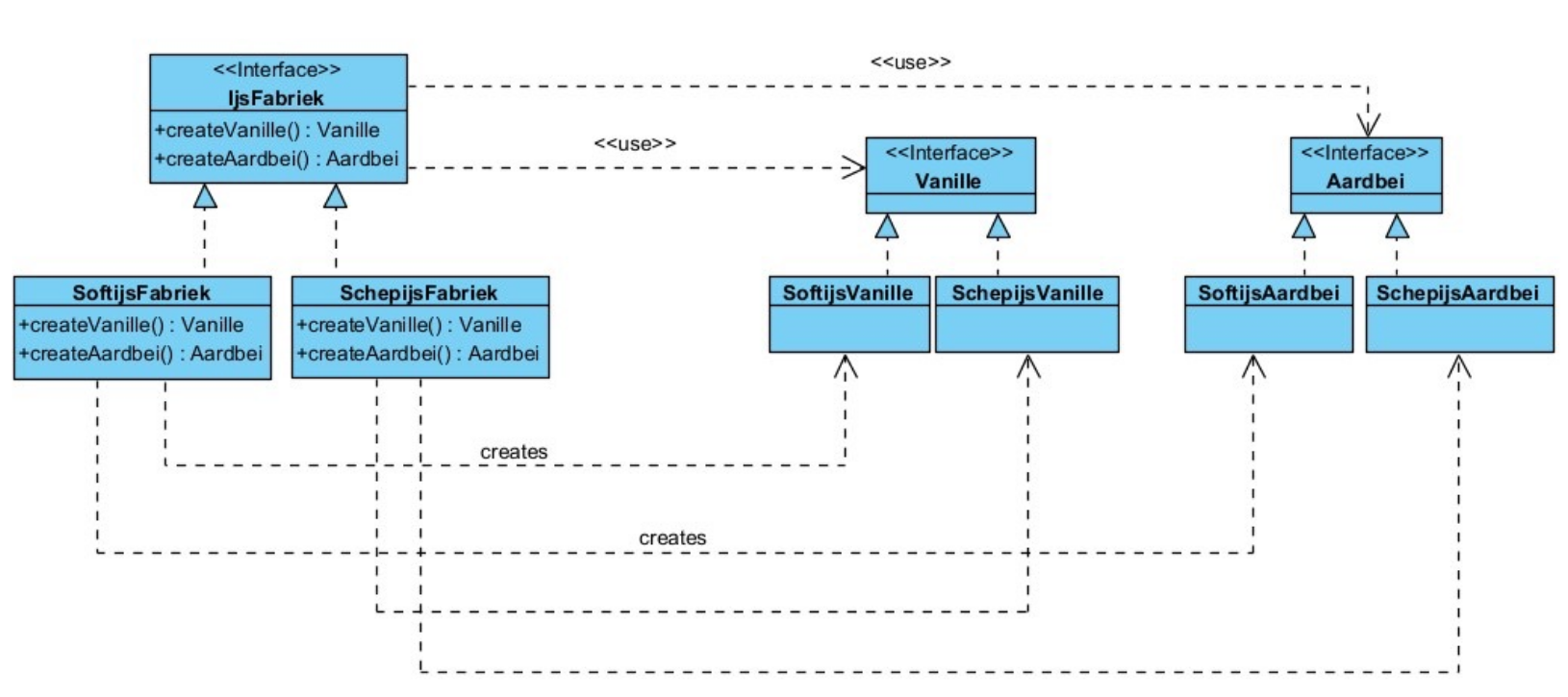
Abstract Factory Een abstracte factory is in zichzelf ook een interface, dit maakt het heel erg aanpasbaar / uitbereidbaar in de toekomst.
Tight and Loose Coupling
Coupling measures how dependent one component is on another:
- Tight coupling: Classes directly depend on concrete implementations
- Loose coupling: Classes depend on abstractions (interfaces/abstract classes)
Technical debt
Technical debt verwijst naar de cumulatieve gevolgen van slechte architectuurkeuzes en ontwerpen. Dit manifesteert zich als:
- Moeilijkere onderhoudbaarheid naarmate het systeem groeit
- Hogere kosten voor het implementeren van veranderingen
- Snellere verslechtering van code kwaliteit Dit is een praktische verkenning aspect dat je moet analyseren wanneer je een bestaande codebase onderzoekt.
Architectural Decision Records - ADR
Iedere beschrijving of visualisatie in architectuur is vastgelegd op één moment in de tijd. De architect die jaren geleden bepaalde keuzes maakte, werkt er wellicht niet meer. Een ADR is een korte documentatie, een soort snapshot, waarmee je architectuurbeslissingen kunt terugberedeneren.
Doel: Je wilt kunnen begrijpen waarom bepaalde keuzes zijn gemaakt, zodat je later kan evalueren of deze nog relevant zijn als omstandigheden veranderen. Dit is geen gestandaardiseerd ding, maar zorg dat je in je project een consistent formaat hanteert.
Events and Queues
Queues
Point-to-point
Point-to-point is een directe communicatievorm tussen systemen:
- Snel te realiseren - Relatief eenvoudig om in te stellen
- Simpel op het eerste gezicht - De initiële implementatie lijkt rechtlijnig
- Niet schaalbaar - Problemen ontstaan wanneer meerdere services hetzelfde bericht moeten ontvangen, omdat berichten maar één keer leesbaar zijn per service, wat tot race conditions kan leiden Dit is geschikt voor point-to-point communicatie als je alleen meerdere kopieën van dezelfde service hebt draaien.
Exchange
Een Exchange is een component in message brokers zoals RabbitMQ dat gebruikt wordt voor publish/subscribe patronen:
- Ontkoppelt producers en consumers - Producers weten niet wie de berichten zal verbruiken en vice versa
- Routing - Gebruikt routing keys om berichten naar de juiste queues te sturen
- Persistentie - Zorgt ervoor dat berichten behouden blijven als consuming services uitvallen
- Default exchange - Voor point-to-point communicatie kun je de default exchange gebruiken Dit patroon lost het schaalbaarheidsprobleem op doordat iedere subscribing service zijn eigen queue krijgt.
Events
Events zijn fundamenteel anders dan request-response communicatie. Verschillende event concepten:
- Systemen die reageren op wat er is gebeurd - Niet op wat er gevraagd wordt
- Asynchrone communicatie - Systemen zijn van elkaar losgekoppeld in tijd en gedrag
- Events as first-class citizens - Events vereisen expliciete afhandeling en gaan niet zomaar verloren
- Events representeren concepten uit de echte wereld - Ze zijn semantisch betekenisvol
UML Class Diagram
UML Class Diagram
What are class diagrams?
Class diagrams are a type of UML (Unified Modeling Language) diagram used to visualise or represent the structure and relationships of classes within a system. This is often used to construct and visualize Object Oriented Systems.
Class diagrams can be summarised as boxes with arrows in between with text in those boxes. In theory this makes it so that you can create this in almost any kind of software, but there are a lot of different arrow types which makes it more difficult to do so. I personally use Draw.io.
Quote
Class diagrams provide a high-level overview of a system’s design, helping to communicate and document the structure of the software. They are a fundamental tool in object-oriented design and play a crucial role in the software development lifecycle.
Source: geeksforgeeks
Notations
Class
A class is simple, I can even show you it in obsidian without having to switch to some drawing software. This is because Obsidian supports Mermaid Diagrams.
---
title: Class example
---
classDiagram
    class ClassName
    ClassName : +String publicField
    ClassName : -Bool privateField
    ClassName : +publicMethod(string) string
    ClassName : -privateMethod(int) bool
In the above example we can see a simple example:
- ClassName: This is the name of the Class or Interface. Whenever it is an Interface, you will put
<<interface>>in front of / above the Classname.- +String publicField: The + or - symbols indicate whether the property / field is public or private. You don’t need to specify whether something is static etc, that will be left for the implementation to decide. Then you put the Datatype of the field, and lastly you put the name of your field.
- +publicMethod(string) string: The + and - mean the same thing here as it does for the fields. Then you follow with the name of the method, in the above case it is called
publicMethod. Then we follow with all parameters we want to pass into the method, you can decide whether you also want to name them(variablename: string)but I personally don’t since it will look cluttered to me. And then you follow it at the end with the: string, this is the return type of the method.Access modifiers
The access-modifiers near attributes and methods are defined like this:
Symbool Betekenis + public # protected ~ package-private - private Relationships
There are a lot of possible relationship types between classes, I am not going to explain them all, but I will show you the picture that I always use whilst modelling my class diagrams. I advice you to visit geeksforgeeks if you want information on a specific relationship. To use these arrows correctly requires you to know these OOP concepts.
I created this myself by using the geeks for geeks example.
You will use the Association line (if you think the table is missing the directional association line, look at Association modifiers) for when the relation is not yet defined. You know that it will have a relation, but it is up to the programmer to decide on how to implement it. This is the clear difference between maintaining an class diagram for already existing code and making a diagram for a system you are going to write in the future.
Here is an example image of my class diagram from an old school project. In this example I have used an different version of the Arrows, which is mostly the same, but with a few changes.
Click here to view the picture in full screen, so that you are actually able to read it.
Association modifiers
These are different ways to show an association:
Symbol Meaning None, a straight line implies it can be navigated both ways > An arrow tells you that class 1 MUST navigate to the other. This X placing a cross on an end of an arrow disallows the relationship to navigate this way. It is impossible So as shown before on the arrow diagram, you can make the association more specific with these 3 above types (which can only be placed on an end of the association line) to be more specific. But it still stays an association.
Multiplicity
Just like an ERD, you are able to specify for each arrow on how many instances there will be. At the classes, the number of instances can be indicated. This notation is placed at the relationships between the classes on the side of the class to which the multiplicity refers.
Notation Meaning 1 There is 1 instance of this class 0..1 There are 0 or 1 instance of this class 1..5 There are a minimum of 1 to a maximum of 5 instances of this class 0..* There are 0 or more instances of this class * There are 0 or more instances of this class 5..* There are a minimum of 5 or more instances of this class You can ofc choose any number. Packages
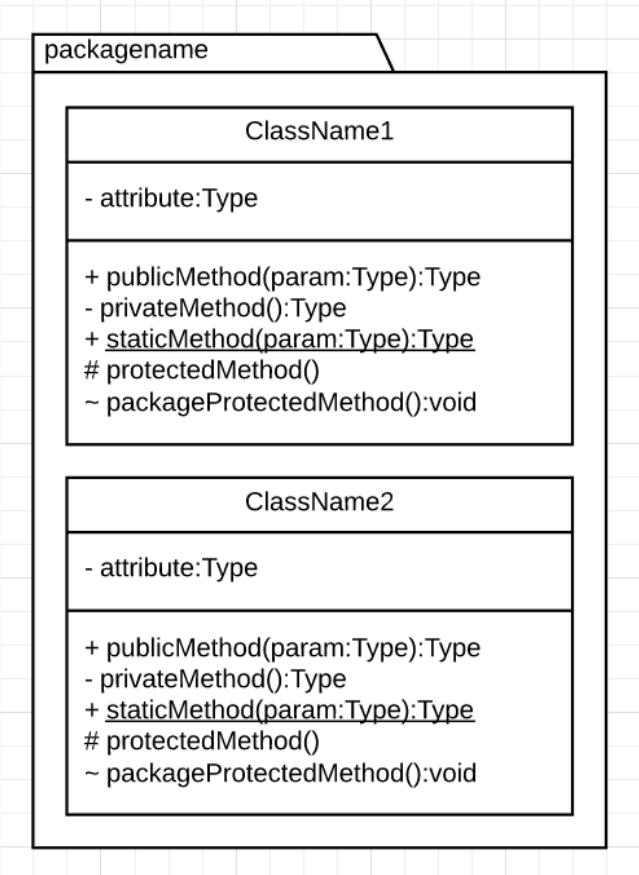
A package is a cohesive group of classes. You organize your classes into packages based on the SRP (Single Responsibility Principle). In the label above the symbol, you specify the package name, and in the package symbol you display the classes that are contained in the package.
The main package is called the Domainmodel. You create an application within a certain context. Take a library for example, everything related to the library is in the domain (renting, books, copies), but extra classes for logic like printing a receipt is not part of the core functionality, the core idea, and is not in the domain model.
You can create an UML Package Diagram to display all the relationships between packages, this way it is kindof like a C4 Diagram where you can create a class diagram for each package. Or you can just create a big class diagram with all packages, but that will get messy. This is mostly where you will take a different approach based on whether you are documenting already made infrastructure, or designing a new system.
References
Link to originalGo visit my friend Thomas his article for more info on this subject.

References
- dit is gebaseerd op theory van de volgende lessen: