In progress
next
- reset pc and laptop bc of claude
- make fn disabled by defualt bc f-keys are superiour
- tremas op de e en andere klinkers (compose keys)
- figure out how waybar works
- figure out why all my icons in my top bar are weird
- set a default window layout with a terminal n stuff
- check out alternative of flatpacks
- configure syncthing
- desktop
- laptop
- win+P
- dark mode as system setting
- install bruno (an appimage) so that win+r recognises it
Todo
-
kitty terminal default startup screen
-
fix it so that i can click obsidian links that open in my prowser
-
the “select as default appp” doesn’t seem to work
-
fix wallpaper
-
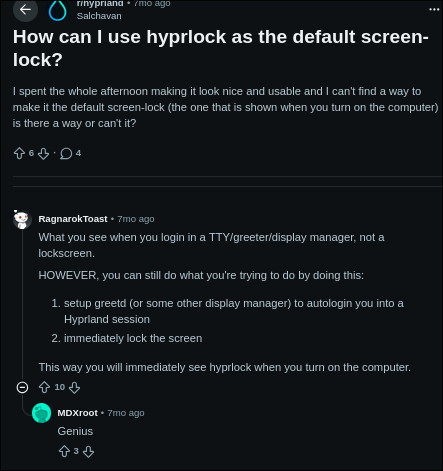
change login screen
https://www.reddit.com/r/hyprland/comments/1oirlax/how_can_i_use_hyprlock_as_the_default_screenlock/
-
learn to use vim (with actual keybinds n stuff)
-
quickshell
-
automatic backups
-
make a list of terminal command to immediately configure my arch (as far as i can) and add a readme with it for manual things.
-
a dashboard of my project status’s & todo list on pc startup
Done
Complete
-
better way to set default app: fix dolphin default apps
-
go back to flameshot
-
enabling num lock by default
-
add bluetooth support
-
get a default panel or sidebar
- time
- battery
-
clipboard on win+v
-
dolphin doesn’t see any files in downloads, whilst file:///home/grace/Downloads/ is not empty
-
other window compositor
-
look into laptop setup
-
Limit amount of processes accordingly, using the wiki at Section
6.4. Do this after using the system for daily driving to get good benchmarks for processes needed. -
item 11: a firewall. on the security page. Do this after installing a GUI
-
learn more about pacman
-
figure out what the hyprland
specialworkspace is -
installing hytale and transferring my world
-
fix screenshots saving to home folder
-
locking the device
-
install Arch Linux
-
clone my repos
-
keybinds for thinks like Konsole and Dolphin
-
installing openMRS
-
install libreoffice
-
Terminal UI’s:
- Lazy Git
- Lazy Docker
-
install docker w default containers n stuff
-
install a picture viewer
-
install jetbrains
-
learn about Arch User Repository - AUR
-
disable middle mouse click pastes
-
KDE resists mouse moving between screens is annoying
-
install arduino IDE
-
login with vscode
-
move over important files from ubuntu
-
add my other git ssh
-
enable numlock on startup
-
disable discord message sounds
-
install syncthing
- and add the synching folder between laptop and PC
- add synching to phone
- move over the entire image archive
-
make My Archlinux Applist
-
install discord
-
install steam
-
fix zen & firefox
-
possably add the nvidia drivers that I possably skipped with Archinstall
-
install Yet another yoghurt - YAY
yay -Sy vscode
-
yet another yogurt -
install this vault
-
create SSH credentials and add them to Github: Git and SSH on Linux
-
install git
-
add all items to grub
-
fix KDE at startup
Archive
- look into additional drivers: https://wiki.archlinux.org/title/General_recommendations#Display_drivers
- enable multilib after installing a window manager
- Arch Linux uses systemd as the init process, which is a system and service manager for Linux. For maintaining your Arch Linux installation, it is a good idea to learn the basics about it. Interaction with systemd is done through the systemctl command. See systemd#Basic systemctl usage for more information. A logging system is also provided, with the command journalctl. See journal for more information.
- Read about system maintenance and upgrading the system
- item 10: Sandboxing applications on the Security page. Read after installing a GUI
- Use wayland over xorg. Read about this in the 6.5 section of the wiki. I will know to do this, when the time comes
- change startup screen
- install all default apps